 Cyclia
Guide
How to use Cyclia, and what the app does with what you enter.
In short
- Tell the app when your period starts and when it stops. Those are the two most important things you do in the app.
- From those days the app works out your cycles, and from them your next period and your fertile window.
- Whatever else you enter, such as symptoms, mood or temperature, is for your own overview and for the Insights screen. It does not change the prediction.
- Are your cycles irregular, for example with PCOS? Then there is a separate setting in which the app predicts more carefully; see Irregular cycles.
- You can export your data, or turn it into a report that you can share with your doctor if you wish.
Getting started: your last period
After the first questions the Today screen opens with the text “Log your last period to get started”. There are two buttons:
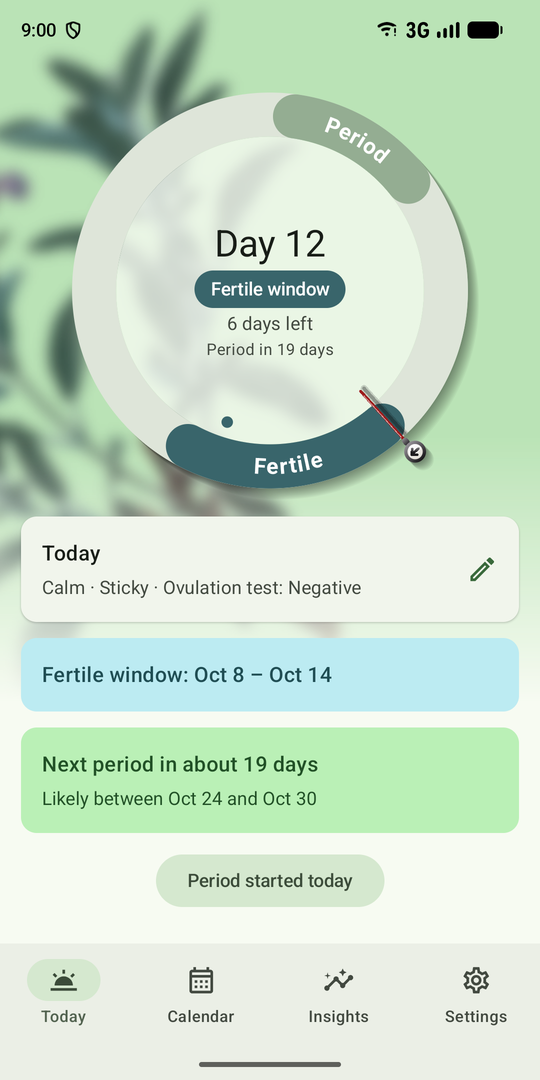
- Period started today: today is the first day.
- Pick an earlier start date: choose the first day of your last period. An estimate is good enough.
After an earlier start date the app asks whether your period is still going on or has stopped. If it is still going on, the app keeps counting until you say it has stopped. If it has stopped, you pick the last day. If the first day is longer ago, the app only asks for the last day.
Period started, period stopped
This is the most important part of the whole app. The prediction works with the first day of every period. If that day is wrong, or missing, the prediction is wrong too.
- On the first day, tap Period started today on the Today screen.
- While it lasts you do not have to do anything. The app adds a day by itself every day. You can still enter the flow and symptoms for a day if you like.
- When it has stopped, tap Period has stopped. The app asks what the last day was: Today, Yesterday or Another day.
Why the first day matters
A cycle runs from the first day of one period to the day before the next. So the app measures the distance between two first days. If you forget to log one period, that cycle looks twice as long, and the prediction shifts.
Why the last day matters
The last day decides how long your period lasted. You see that length on the calendar, and the app uses it to show how long the next period will probably last. If you do not mark the end, the period runs on too long in the app.
What the ring shows
- While your period is going on, the period part of the ring is an estimate: the average of your earlier periods, or the length from Settings if you have none yet.
- Once you have said it has stopped, the ring shows the real length of this period. It stays that way until your next period starts.
- When a new period starts, the ring shows the estimate again, until you have closed that one too.
Ovulation and the fertile window do not change with the last day. They depend on the first day of your period and on your cycle length.
If you forget
- A period you do not close ends by itself in the app, four days after the period length you set under Settings, Your cycle. With the default of 5 days that is after 9 days.
- The Today screen then asks once whether your period really lasted that long. Tap Yes, that is right, or No, change it to correct the last day.
- Under Settings, Reminders you can switch on the reminder Period stopped?. You then get a notification every day once your period runs longer than usual, until you say it has stopped.
- You can always correct things afterwards; see Correcting something.
Spotting does not count as the start of a period. Choose Light, Medium or Heavy for a day that does count.
Using the calendar
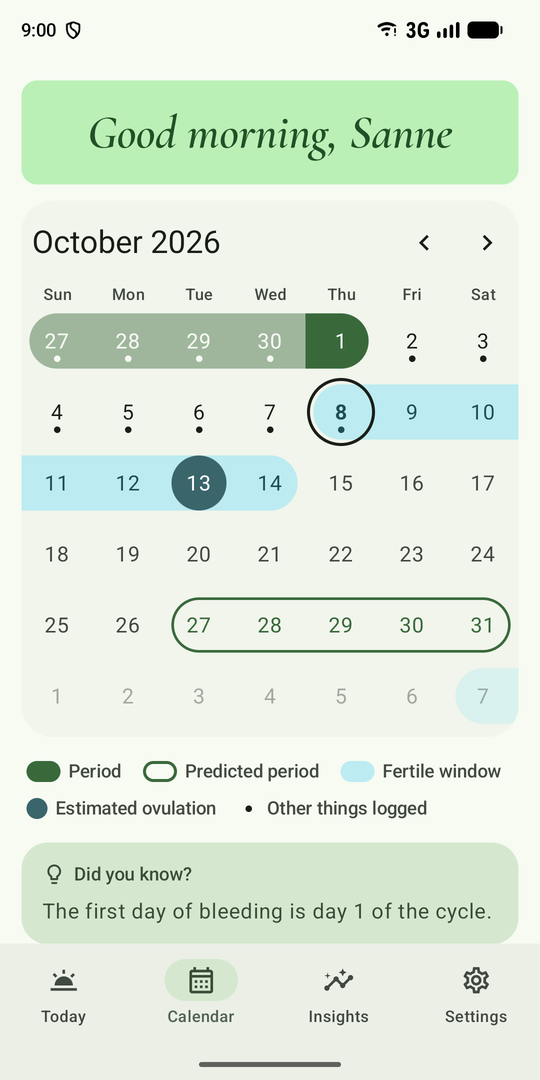
The calendar shows per month what you have logged and what the app predicts. Days that belong together form one continuous band.
- Period: days that have been logged.
- Predicted period: an estimate, with only an outline.
- Fertile window: an estimate, also for cycles that are over.
- Estimated ovulation: the dark dot in the fertile window.
- Today: the day with the dark ring around it.
- Other things logged: a small dot under the number means you entered something else that day.
With the setting for irregular cycles on, the band is called Possibly fertile, it is wider, and there is no dot for ovulation. The calendar then shows only the next predicted period.
Tap a day to open it. You can do that for today and for days in the past; days in the future cannot be filled in. There you enter:
- Period: Spotting, Light, Medium or Heavy. A day with Light, Medium or Heavy counts as a period day.
- Symptoms and mood, fertility signs, intimacy, medication and notes, as far as you switched them on under Settings, What you track. The symptoms include cramps, headache, acne and fatigue, and also pelvic pain, oily skin, hair loss and more hair growth.
What you change is saved at once. On a day of a running period there is also the button Period ended on this day, which closes the period on that day.
Period days that are at most two days apart count as the same period. So one forgotten day in between does not split it in two.
The speech bubble under the calendar
Under the calendar there is one sentence every day. One day it is a general fact, headed “Did you know?”. The next day it is something from your own data, headed “From your own data”: for example how long your cycle lasts on average, how you most often feel in which phase, or which symptom you often log just before your period.
Such a personal sentence only appears once you have logged something often enough and in more than one cycle. The app only knows what you enter, and only states what it sees; it is not advice.
Correcting something
On the Today screen, tap Edit periods. You see all your periods in a list.
- Tap a period to change its first or last day, or to delete it.
- Tap Add period to log a period you forgot.
The prediction is worked out again right away.
How the prediction works
This is how the app calculates normally. If your cycles are irregular, also read Irregular cycles.
- Cycle length. The app takes the average of your last six cycles. Recent cycles weigh more than older ones.
- Unlikely cycles. A cycle shorter than 15 or longer than 60 days is left out. Usually a period was not logged then.
- At the start. While you have no cycles of your own yet, the app works with the lengths under Settings, Your cycle.
- The margin. With the predicted date comes a range in which your period will probably start. At first that is three days earlier or later. From three cycles on, the margin follows how much your own cycles differ, from one to seven days.
- Ovulation and fertile window. Ovulation is estimated at 14 days before the expected period. The fertile window runs from five days before it to one day after.
The more cycles you log carefully, the better the prediction fits you.
The predictions are estimates. Cyclia is not a contraceptive and not a medical device, and does not replace advice from a doctor.
Irregular cycles
Are your cycles irregular, for example with PCOS, around menopause or after stopping the pill? Then switch on My cycles are irregular. You can do that when setting up the app and later under Settings, Your cycle. The app is then more careful:
- Long cycles count. Cycles of up to 120 days count, instead of up to 60.
- The middle value. The app takes the middle one of your last six cycles, so one very long cycle shifts the prediction less.
- A wider margin. At first seven days earlier or later; after that the margin follows your cycles, from three to 21 days. That is why the Today screen names a range: “Next period probably between…”.
- No ovulation day. With irregular cycles it cannot be pointed out. Instead you see one wide band Possibly fertile, covering every day on which ovulation may fall. With very different cycles that band can take up a large part of the cycle.
- Not “late”. Once the expected range has passed, the app only says your period has not started yet.
- Reminders. The reminder for your period counts down to the start of that range and says your period “may start”.
- Setting the cycle length. Under Settings, Your cycle you can then choose a length of up to 120 days.
You can switch the setting off again at any time; what you logged stays. Logging itself stays the same. With irregular cycles a careful record is especially valuable, for example to discuss with your doctor.
Cyclia makes no diagnosis. This setting only changes how the app calculates.
What happens to your data
Everything you enter is stored encrypted on your own phone. The calculations happen on the phone itself. The app has no permission to use the internet, contains no analytics and does not follow you. You can keep your data in an encrypted backup, export it, or take it to your doctor as a report. The privacy policy says more about this.